
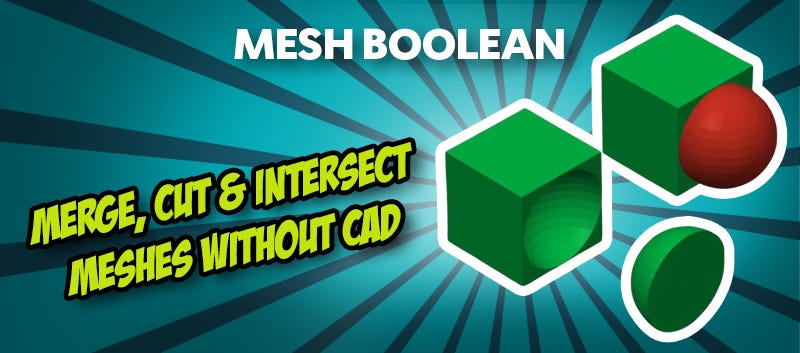
Mesh Booleans in 3D Printing: Cut, Combine & Customise Models Without CAD!
Do you need to quickly merge two STL files, add a recess for a magnet, or precisely fit a model into a housing, but find yourself dreading the thought of complicated CAD software? The good news is that most of the time you won't need it anymore. Modern slicers such as PrusaSlicer, Bambu Studio, and OrcaSlicer now feature integrated Mesh Boolean functions, allowing you to handle these exact tasks directly within your slicing software.
This can save you a tremendous amount of time in your projects. Instead of constantly switching back and forth between different programmes, you can edit your models exactly where you prepare them: in your slicer of choice.
Why Mesh Boolean Functions are So Practical
Many typical hurdles in 3D printing aren't actually related to the printing process itself, but rather the preparation of the models. You might want to merge components, make adjustments, or remove sections, but perhaps you lack the appropriate CAD software or simply don't want to spend hours learning a new, complex tool.
This is exactly where Mesh Boolean operations come in. They enable basic model editing directly in the slicer without needing programmes like Blender or Fusion 360, which are often far too complex for minor tweaks anyway. This not only streamlines your workflow but also makes it significantly faster.
UNION: Merging Multiple STL Files into One Model
One of the most common applications is merging several parts. Using the Union function, you can combine two or more models into a single, manifold mesh.
This is particularly helpful if:
- You want to print multi-part models as a single piece,
- Individual components need to be joined with absolute precision,
- You want to avoid glueing or extensive post-processing.
Instead of slicing several parts separately, you can combine them directly and print them as a single component. Especially with tight-fitting connections, this can significantly improve the overall structural stability.
SUBTRACTION: Cutting Out Specific Shapes
The Subtraction function is just as useful. It allows you to subtract one object from another, effectively removing specific areas from your model.
Typical use cases include:
- Creating recesses for magnets,
- Adding cable channels to housings,
- Logo cut-outs or engravings,
- Providing clearance for screws or inserts.
Simply place a second object where you want material to be removed and let the slicer handle the rest. It is an incredibly easy way to customise models on the fly.
INTERSECTION: Keeping Only the Overlap
The third key function is Intersection. In this mode, only the area where two models overlap is retained.
While this might sound niche at first, it is incredibly practical if you:
- Need to fit a model perfectly into a specific housing,
- Have to "trim" components to specific dimensions,
- Only require a particular section of a larger model.
This function can save you a great deal of time, particularly when making precision adjustments within your 3D printing workflow.
Which Slicers Currently Support Mesh Booleans (as of April 2026)?
The good news is that you don't need any specialised software. Many modern tools already have these functions built in. Currently, the following slicers support Mesh Boolean functions:
- PrusaSlicer,
- Bambu Studio,
- OrcaSlicer.
The interface is usually intuitive and integrated directly into the workflow. This means: no exporting, no app-switching, and no unnecessary extra effort.
When Mesh Booleans are Particularly Worthwhile
Mesh Boolean functions are ideal for anyone looking to work quickly and efficiently. They are especially useful if you want to:
- Adjust STL files without opening a CAD suite,
- Combine or modify models on the fly,
- Make functional adjustments just before printing,
- Simplify your overall workflow.
Avoiding Common Mistakes
Even though these functions seem straightforward, there are a few things to keep in mind. Above all, it is vital that your models are aligned correctly; if objects are not positioned accurately, the result can be unexpected.
Furthermore, ensure that the meshes do not contain any errors. "Non-manifold" or corrupted STL files can lead to issues during the calculation process.
Conclusion: Work Smarter Directly in the Slicer!
Mesh Boolean functions demonstrate just how much slicers have evolved in recent years. What used to require complex CAD software can now be achieved directly in the slicer. Whether you want to merge, adjust, or specifically edit models, the Union, Subtraction, and Intersection tools give you exactly what you need for a more efficient 3D printing experience.
Related products
Magazine Articles:
Discover 3DJake:
-
Switzerland: Free standard delivery from CHF 69.90
-
Delivery in 3 business days.
More than 11.050 products
We deliver worldwide to
more than 40 countries
